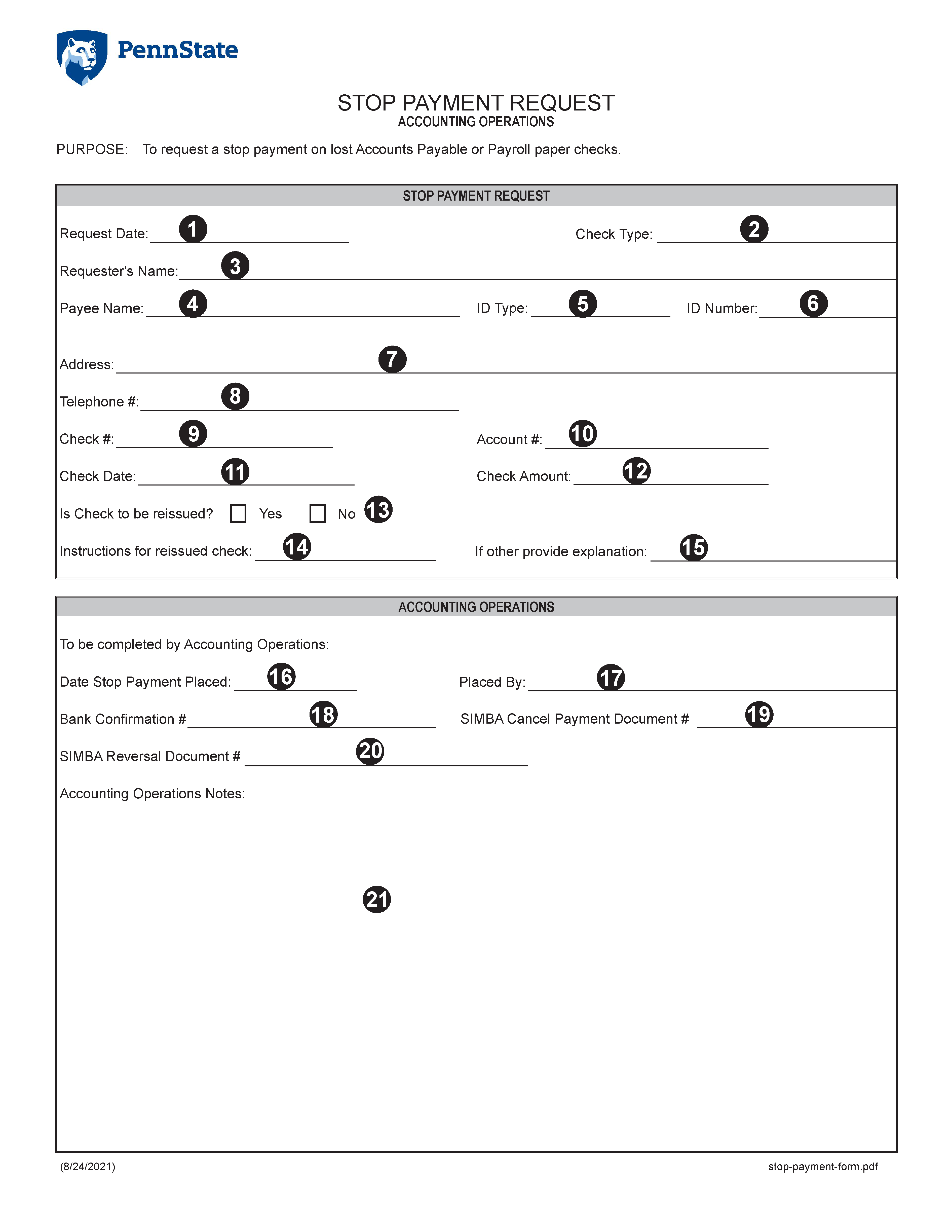
STOP PAYMENT REQUEST FORM
Form Instructions
Items 1 through 15 are to be completed by the Requester of the Stop Payment Request:
- Select the date this request form is being completed from the drop-down calendar
- Select the appropriate check type from the drop-down list. Options include Accounts Payable or Payroll
- Enter the name of the individual preparing this form
- Enter the Payee Name as it appears on the check
- Select the appropriate ID type from the drop-down list. Options include PSU Employee #, SIMBA Supplier #, or Student Refund
- Enter the corresponding ID number
- Enter the complete mailing address of the Payee including street address, city, state, and zip code
- Enter the Payee's telephone number, including area code
- Enter the check #
- Enter the Account # as it appears on the face of the check
- Select the Check Date from the drop-down calendar
- Enter the Check Amount
- Is the check to be reissued? Select Yes or No from the drop-down list
- Select the instructions for reissued check from the drop-down list. Options include Mail Check, Pick-Up Check, or Other. If other selected, complete next section
- If other is selected in reissue check instructions, provide complete details
Items 16 through 21 are to be completed by the Accounts Payable team:
- Select the date stop payment placed from the drop-down calendar
- Enter the name of the individual placing the stop payment
- Enter the bank confirmation number
- Enter the SIMBA Cancel Payment Document number
- Enter the SIMBA Reversal Document number
- Enter any notes as appropriate