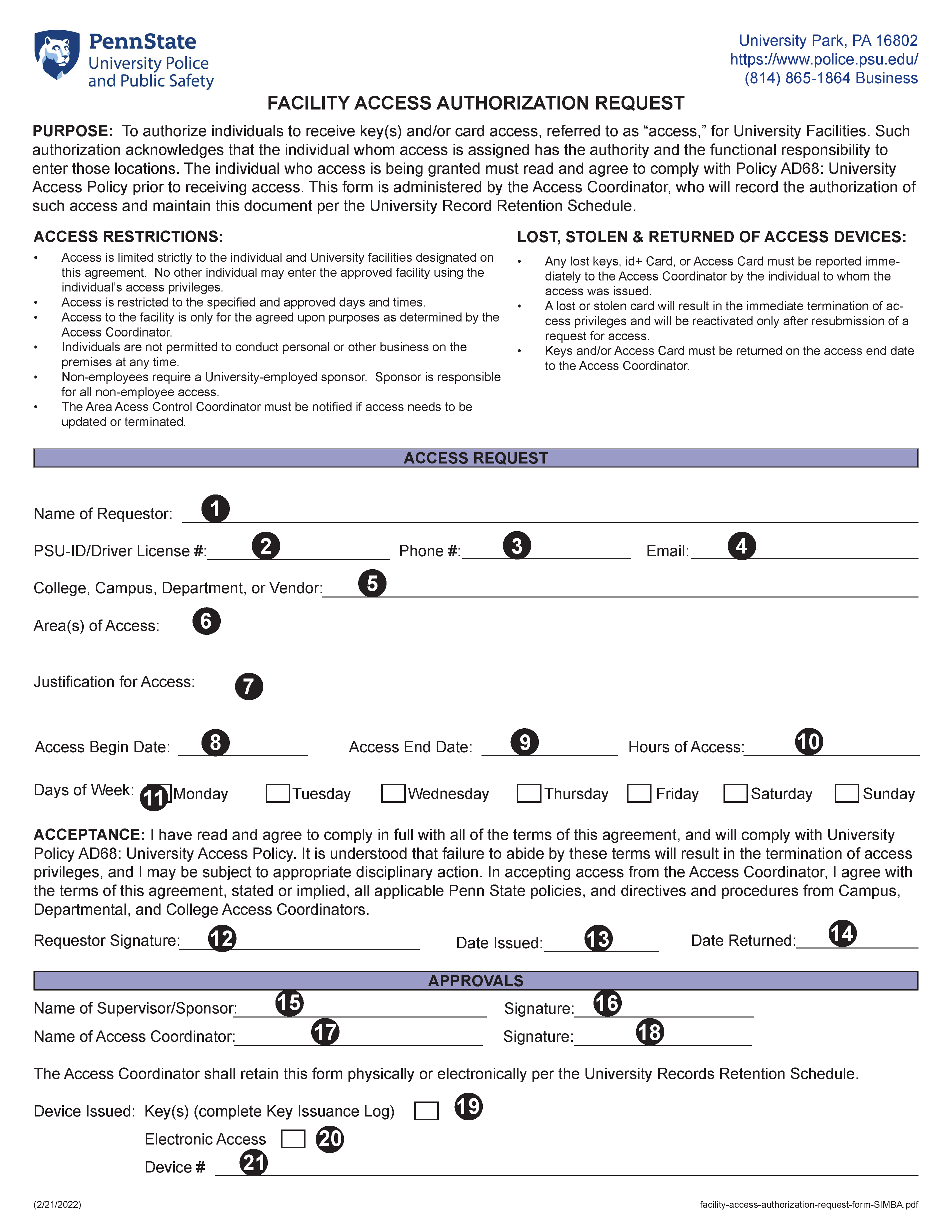
Facility Access Authorization Request Form Instructions
Enter the name of the individual requesting access authorization
Enter the PSU-ID (employees) or Driver's License number (non-employees), as applicable
Enter the phone number of the Requestor, including area code
Enter the requestors' email address
Enter the requestors' college, campus, department (employee) or company name (non-employee)
Specify the area(s) where the requestor needs access, providing details such as building name(s), floor(s), room number(s) and/or other defining details
Provide clear details specifying WHY the requestor requires access to said locations. Attach explanatory details if needed
Select the start date of access
If temporary request, select the end date of access. If permanent request, leave this field blank
Enter the hours of access (i.e., 8:00 am - 5:00 p.m.)
Check all days of the week on which access is required
The Access Coordinator checks the Key(s) box if issuing keys and completes the Key CCURE Issuance Log
The Access Coordinator checks the Electronic Access box if issuing electronic access and completes the Key CCURE Issuance Log
The Access Coordinator records any device numbers
The requestor must provide either a hand-written signature or provide their digital ID
Select the date access is issued
This field is only completed when access is removed
Enter the name of the requestors' supervisor (employee) or sponsor (non-employee)
The Supervisor/Sponsor must provide either a hand-written signature or their digital ID
Enter the name of the Access Coordinator granting access
The Access Coordinator must provide either a hand-written signature or provide their digital ID