Last Revision: 02/24/2026
PURCHASING CARD SUPPORT FORM INSTRUCTIONS
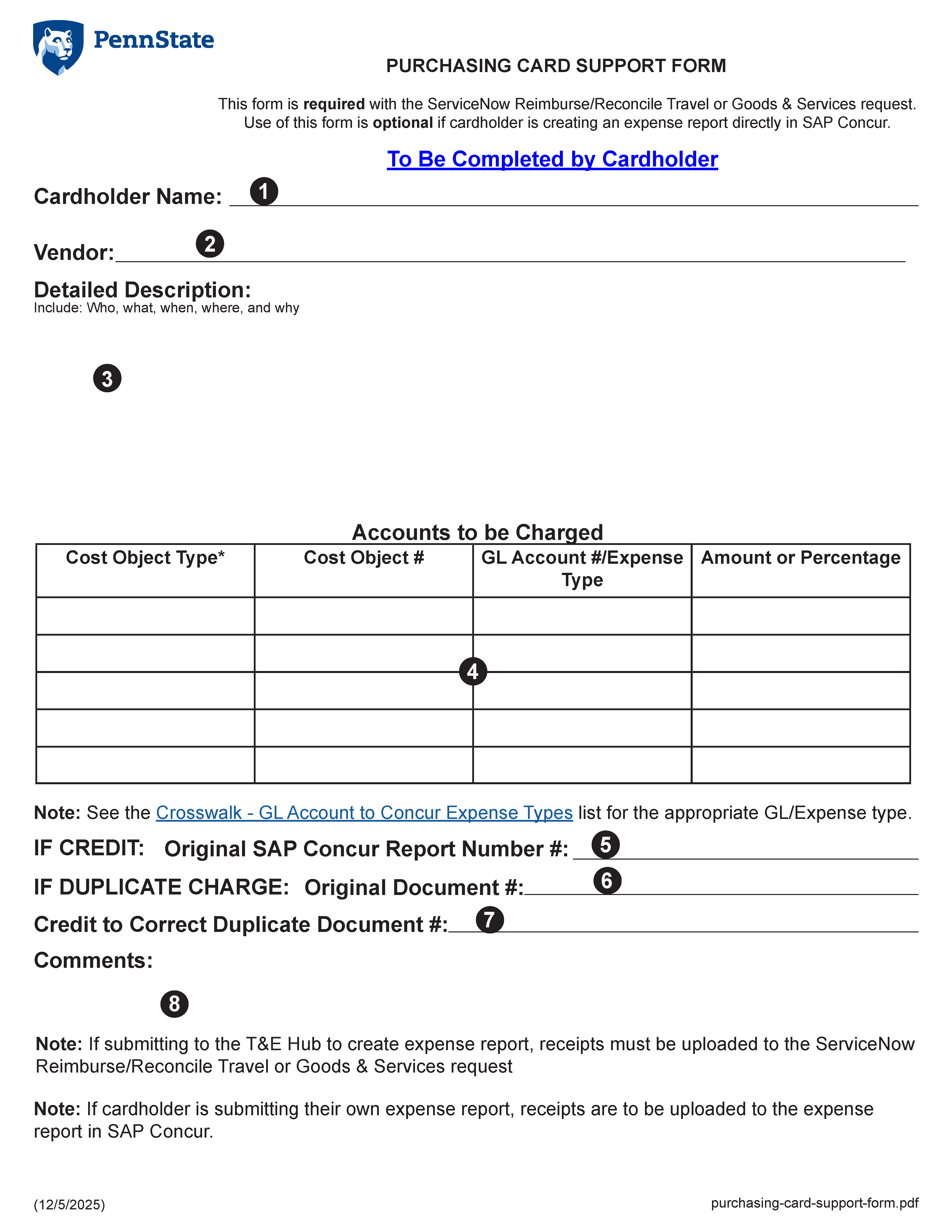
- Enter the PCard Holder's name
- Enter the vendor name for this transaction receipt
- Enter a detailed description of the purchase
- Account to be charged table - This table contains four (4) columns and five (5) rows
- Column 1 - Select the Cost Object Type from the drop down list. Options include:
- Cost Center
- Internal Order
- Work Breakdown Structure
- Column 2 - Enter the 10-12 digits Cost Object number to be charged
- Column 3 - Enter the eight (8) digit General Ledger Account to be charged
- Column 4 - Amount - Enter the dollar amount to be charged to this Cost Object and General Ledger Account numbers
- If a credit has been received, enter the original document number
- If duplicate transactions occurred, enter the original document number
- If a duplicate transaction occurred, enter the credit document number to correct the transaction
- If the account or Cost Object information entered in SIMBA is different than reported by the Cardholder, please note that information in this area