SUBSTANTIATION FOR LOST OR UNOBTAINABLE RECEIPTS FORM INSTRUCTIONS
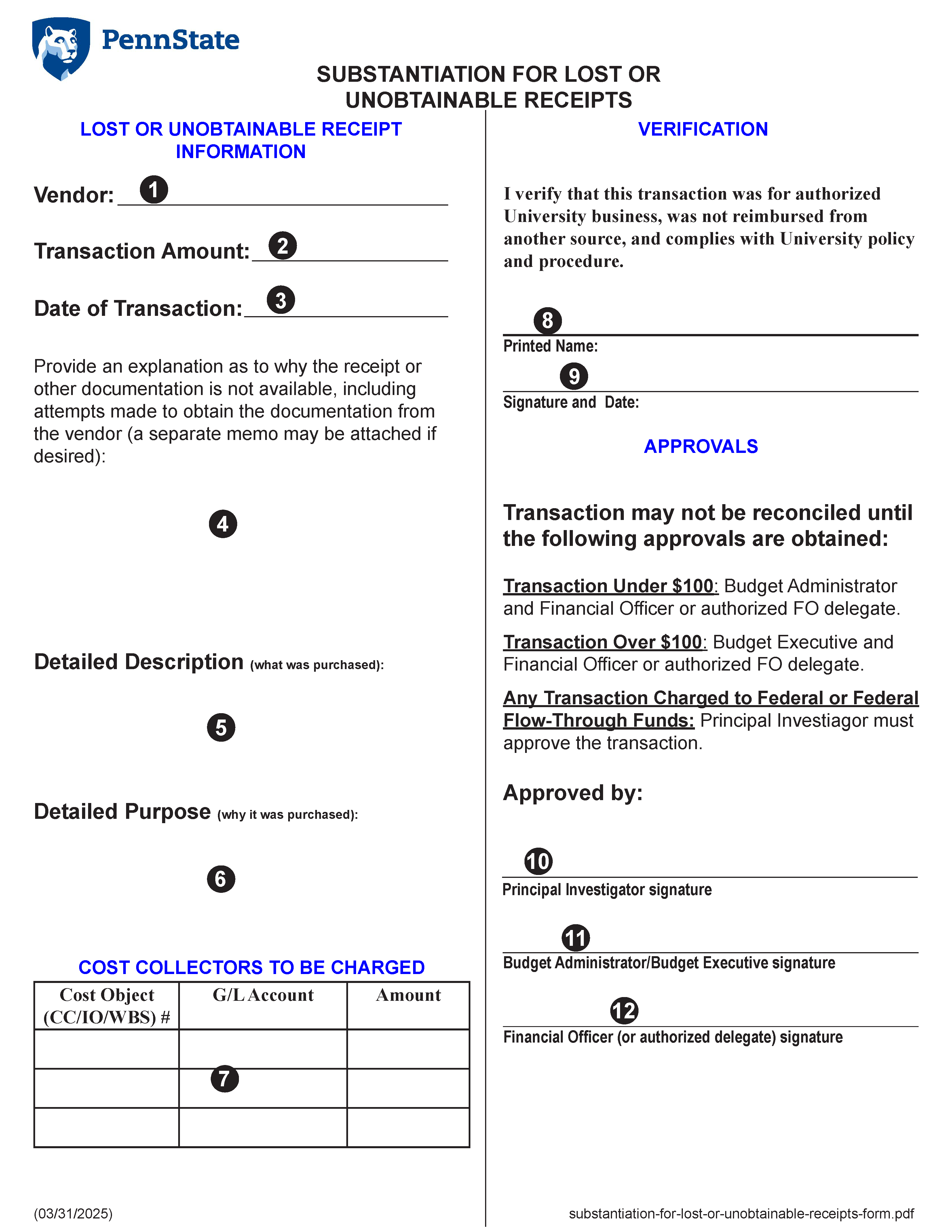
Vendor - Enter the name of the vendor from whom the purchase was made
Transaction - Enter the total dollar amount of the transaction
Date - Select the date the transaction occurred from the drop-down calendar
Explanation - Prove an explanation as to why the receipt or other documentation is not
available, including attempts made to obtain the documentation from the vendor (a separate memo
may be attached if necessary)
Description - Provide a detailed description of what was purchased
Purpose - Provide a detailed purpose of why it was purchased
Account to be charged table - The account to be charged table contains four (4) columns, one header row, and five (5) data rows as follows:
Column 1 - Cost Object Type - Select the appropriate Cost Object Type from the drop-down list. Options include Cost Center, Internal Order, and Work Breakdown Structure Element (WBSE)
Column 2 - Cost Object Number - Enter the Cost Object number
Column 3 - General Ledger Account Number - Enter the general ledger account number
Column 4 - Amount - Enter the amount to be charged to this Cost Object number and GL account
Printed Name - Enter the name of the individual associated with the transaction
Signature and Date - The individual associated with the transaction must provided either a hand-written signature or provide their digital ID. If a hand-written signature is provided, include the date the form was signed.
PI - If the transaction is charged to a grant or contract, the Principal Investigator must provide either their hand-written signature and the date the form is signed or provide their digital ID. If not charged to a federal grant or contact, skip to the Budget Assistant/Budget Administrator approval
BA - The Budget Assistant or Budget Administrator approving the transaction must provide either a hand-written signature or provide their digital ID. If a hand-written signature is provided, include the date the form was signed.